Azure Service Bus Explorer for macOS and Linux
Published July 21, 2026
QueueExplorer provides a desktop Azure Service Bus Explorer for macOS and Linux. Connect it to an Azure Service Bus namespace to browse queues and topic subscriptions, inspect message bodies and properties, work with dead-lettered, deferred, scheduled, and session messages, and create or replay test messages without a Windows virtual machine.
Native downloads are available for Apple Silicon and Intel Macs, plus x64 and ARM64 Linux systems. Linux users
can choose .deb, .rpm, AppImage, or tar.gz packages from the
QueueExplorer download page.
Azure Service Bus Explorer options on macOS and Linux
The name “Service Bus Explorer” can refer to two different existing tools: Microsoft's data-operations blade in the Azure portal, or the separate community-owned Windows desktop application. macOS and Linux users have three main approaches:
| Option | Runs on | Best for | Main limitation |
|---|---|---|---|
| QueueExplorer | macOS, Linux, Windows | Message browsing, filtering, editing, moving, replay, sessions, and special message states | Commercial desktop application with a free trial |
| Azure portal Service Bus Explorer | Web browser | Occasional peek, send, receive, settlement, and purge operations | No emulator or session support; browser and large-message limitations |
| Community Service Bus Explorer | Windows 10 or later | Free Windows desktop administration and message testing | No supported native macOS or Linux version |
| Azure Service Bus SDK | Cross-platform | Custom scripts, runbooks, and application-integrated workflows | You must build the interface, safeguards, retries, and audit trail |
For automation or monitoring rather than interactive message work, use the Azure CLI, PowerShell, a current Azure Service Bus SDK, or Azure Monitor. The broader Azure Service Bus Explorer alternatives comparison explains where each tool fits.
QueueExplorer versus the community desktop Service Bus Explorer
Platform support is not the only difference:
- QueueExplorer starts displaying messages when you browse a queue or subscription; the community Explorer requires messages to be loaded manually each time.
- QueueExplorer has dedicated JSON, XML, text, WCF, and hexadecimal body viewers; the community Explorer has a text view without dedicated JSON or XML viewers.
- QueueExplorer Professional can extract JSON, XML, or text values with JSON expressions, XPath, or regular expressions and display them as custom columns; the community Explorer has no equivalent custom columns.
- QueueExplorer can export and import definitions or copy them between namespaces. The community Explorer exports definitions but does not import them, so it does not provide the same schema-migration workflow.
What QueueExplorer can do with Azure Service Bus
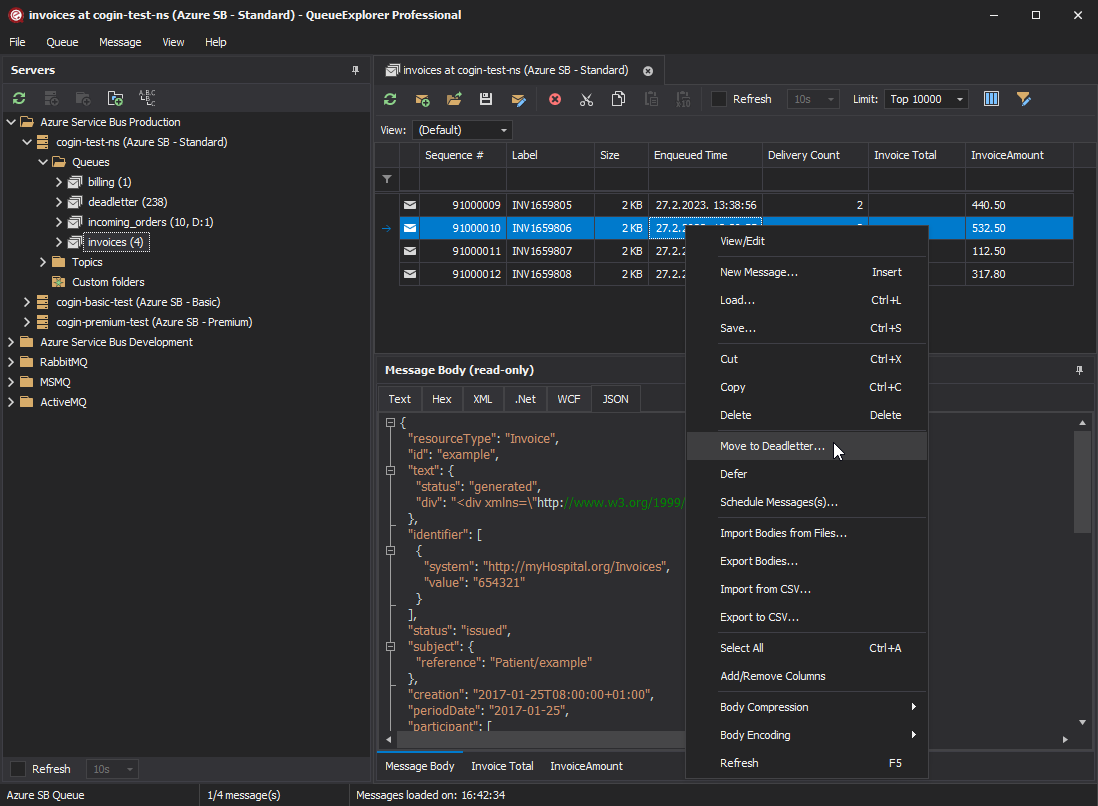
- Browse queue and topic-subscription messages progressively in a selectable grid.
- Display standard and application properties as columns, then sort or filter the loaded messages.
- Inspect JSON, XML, text, WCF, and binary bodies with format-specific viewers.
- Browse dead-letter, transfer, transfer dead-letter, deferred, and scheduled message states.
- List sessions, inspect messages grouped by Session ID, and view or edit session state.
- Create and edit test messages, or copy, move, delete, defer, schedule, save, and load selected messages.
- Export and import queue, topic, and subscription definitions, or copy them between namespaces.
- Keep Azure Service Bus, RabbitMQ, and ActiveMQ connections in the same application.
Free trial for Windows, macOS, and Linux
Install QueueExplorer on macOS
- Open the QueueExplorer download page.
- Choose the Apple Silicon ARM64 package for an M-series Mac, or the Intel x64 package for an Intel Mac.
- Open the downloaded
.dmgand install QueueExplorer like another macOS application. - Start QueueExplorer and create an Azure Service Bus connection.
To check which processor your Mac uses, open About This Mac. Apple M1, M2, M3, M4, and later Apple processors use the ARM64 download. Macs showing an Intel processor use x64.
Install QueueExplorer on Linux
The download page provides x64 and ARM64 builds in several package formats:
| Package | Typical use |
|---|---|
.deb | Debian, Ubuntu, and related distributions |
.rpm | Fedora, RHEL, Rocky Linux, AlmaLinux, and related distributions |
| AppImage | Portable use without installing a distribution-specific package |
tar.gz | Manual extraction or environments that do not use the available packages |
- Check the system architecture with
uname -m.x86_64uses the x64 download;aarch64orarm64uses ARM64. - Download the package that matches the distribution and architecture.
- Install it with the normal package tool, or make the AppImage executable before launching it.
- Start QueueExplorer and create an Azure Service Bus connection.
The concise QueueExplorer for Linux page always points to the current download location and can be expanded with platform-specific notes as they become necessary.
Connect from macOS or Linux to Azure Service Bus
QueueExplorer supports Microsoft Entra ID login on macOS and Linux. Authentication is handled by Microsoft's login dialogs; QueueExplorer does not receive the user's password and can perform only the Service Bus operations allowed by the signed-in user's Azure roles.
- In QueueExplorer, create a new Azure Service Bus connection.
- For Entra ID, enter the namespace and optional tenant ID, choose Login, and complete Microsoft's sign-in flow.
- Alternatively, supply a SAS connection string for the namespace or a single queue or topic.
- Open the connection to list the namespace topology or the entity available to the scoped connection.
- Select an entity to begin browsing its messages.
For an Entra ID namespace view, Reader allows QueueExplorer to enumerate queues, topics, and subscriptions but does not grant message access. Add Azure Service Bus Data Receiver, Data Sender, or Data Owner at the namespace or individual entity scope according to the required operations.
A namespace-level SAS connection needs Manage access so QueueExplorer can enumerate queues, topics, and
subscriptions. For narrower access, QueueExplorer can connect with a connection string for one queue or topic;
Listen permission is enough for read-only message browsing on that entity. Add only the further rights required
for sending or management operations, and avoid RootManageSharedAccessKey when a narrower policy will do.
Listen is not a Peek-only permission: it also authorizes receive and settlement operations. Use message browsing when the investigation must not change the entity.
QueueExplorer can also connect directly to the Azure Service Bus Emulator by host name, with optional AMQP and administration port overrides. See the complete connection guide.
The computer running QueueExplorer must be able to reach the namespace. If public network access is disabled, run it on a Mac or Linux workstation connected to the virtual network through the appropriate private access, VPN, or corporate network path.
Browse and inspect Azure Service Bus messages
Select a queue or topic subscription to load messages progressively. Click a row to inspect its body and fields such as Sequence Number, Message ID, Correlation ID, Subject, Session ID, Delivery Count, enqueue time, expiry, and application properties.
Filtering applies to messages QueueExplorer has loaded because Azure Service Bus does not provide a server-side full-text query across every stored message body. Start with a practical limit and increase it carefully when the target message is deeper in the entity.
Use the dedicated views for dead-letter, deferred, and scheduled messages rather than treating every stored message as active. For session-enabled queues or subscriptions, open the session list and select a Session ID. The detailed Azure Service Bus message browsing guide explains those states and safe Peek behavior.
Why use a desktop tool instead of only the Azure portal?
The portal Explorer is useful for a quick Peek, send, receive, settlement, or purge and works from a browser on macOS or Linux. Microsoft currently documents that it does not support sessions, and its browser workflow has special handling and timeout limitations for large messages. It also cannot connect to the Azure Service Bus Emulator; QueueExplorer can connect directly to the emulator host and ports.
A desktop message workbench is more useful when an investigation requires a persistent selectable list, body-specific viewers, filtering across loaded messages, session and special-state access, saving or moving a selection, or comparing several namespaces. Azure Monitor should still handle production metrics and alerts.
Security and production precautions
- Confirm the Azure tenant, namespace, entity, and subqueue before changing a message.
- Use a narrowly scoped credential and separate read-only investigation from destructive work.
- Load the smallest useful batch and pause competing consumers when the exact selection matters.
- Save important messages before deleting, editing, moving, rescheduling, or replaying them.
- Do not expose credentials or sensitive payloads in screenshots, terminal history, or support tickets.
- Keep QueueExplorer updated so its Azure Service Bus client and platform fixes remain current.
Frequently asked questions
Does Azure Service Bus Explorer run on macOS?
The community open-source Service Bus Explorer documents Windows as its supported platform. QueueExplorer has native Apple Silicon and Intel macOS downloads, and the Azure portal Explorer works in a browser for Azure-hosted namespaces, but not for the Azure Service Bus Emulator.
Does Azure Service Bus Explorer run on Linux?
QueueExplorer provides native Linux builds for x64 and ARM64 as .deb, .rpm, AppImage,
and tar.gz downloads. Wine is not required for the current Linux application.
Can QueueExplorer on macOS or Linux browse Azure Service Bus sessions?
Yes. It can list sessions, browse the messages in each Session ID, and display or edit session state. Editing state can affect application checkpoints, so preserve the original and understand its schema first.
Can I use QueueExplorer with an Azure Service Bus private endpoint?
Yes, when the Mac or Linux computer has network and DNS access to the private endpoint and its connection is authorized. Installing a desktop tool does not bypass namespace firewall or private-network rules.
QueueExplorer: a better way to inspect and manage Azure Service Bus
See what is happening in Azure Service Bus and resolve message problems without writing one-off tools. Browse queues and topic subscriptions, inspect message contents, and manage your Azure Service Bus environment from one desktop application. Try it free on Windows, macOS, or Linux.