How to copy Azure Service Bus queues, topics, and subscriptions between namespaces
Published July 21, 2026
QueueExplorer groups copying, exporting, importing, and comparing queueing-object definitions under schema operations or metadata operations. In this context, schema means Azure Service Bus queues, topics, subscriptions, rules, and their configuration. It does not mean the JSON or XML schema of a message body.
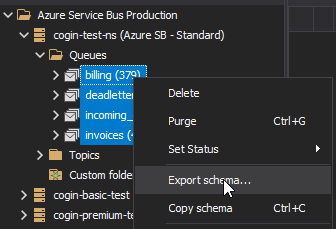
To copy these definitions between namespaces, connect QueueExplorer Professional to the source and target, select the required queues or topics, choose Copy schema or Export schema, then paste or import the definitions into the target. Review the comparison and apply only the intended creates or changes.
Schema operations also work with the Azure Service Bus Emulator. An emulator can be the source or destination for copying, exporting, importing, or comparing queues, topics, subscriptions, and rules. This is useful for reproducing cloud topology locally or promoting a locally tested definition set to an Azure namespace.
What Azure Service Bus schema or metadata includes
Azure documentation usually calls queues, topics, and subscriptions entities or Azure Resource Manager resources. QueueExplorer uses schema as a convenient name for their definitions and relationships.
| Part of an entity-definition migration | Separate from entity definitions |
|---|---|
| Queue and topic names and supported properties | Messages and their current broker state |
| Subscriptions, filters, and rule actions | Namespace region, SKU, capacity, and Premium partitions |
| TTL, lock, delivery-count, session, and dead-letter settings | Private endpoints, firewall rules, virtual-network integration, and DNS |
| Duplicate-detection, size, status, and ordering settings where supported | Microsoft Entra roles, managed identities, SAS secrets, and application configuration |
| Auto-forward and dead-letter-forward destination references | Metrics history, diagnostic settings, alerts, logs, and dashboards |
The exact fields that can be created or changed depend on the source and target namespace tiers, the Azure Service Bus API, and whether an object already exists. Treat the migration preview as the source of truth for each selected definition rather than assuming every source field can overwrite every target field.
Why copy Azure Service Bus definitions?
- Environment promotion: reproduce reviewed queues, topics, subscriptions, and rules from development in test, staging, or production.
- Namespace migration: prepare a replacement namespace in another resource group, subscription, region, tenant, or security boundary.
- Blue-green change: build and validate a parallel namespace before switching producers and consumers.
- Disaster-recovery preparation: keep a known definition set that can recreate messaging topology.
- Drift detection: compare namespaces and identify missing or different entity settings.
- Duplication: copy an entity in the same namespace and give the new object another name.
1. Prepare the source and target namespaces
- Inventory the source queues, topics, subscriptions, rules, forwarding relationships, and namespace-level features.
- Create the target Azure namespace with the required region, SKU, capacity, partitioning, network, identity, and encryption settings, or start and configure the target Azure Service Bus Emulator.
- Confirm the target tier supports every required feature, including topics, sessions, duplicate detection, and auto-forwarding.
- Connect QueueExplorer to both namespaces with Microsoft Entra ID or SAS and permission to read source definitions and create or update target entities.
- Pause unrelated schema changes or record a migration boundary so the source does not drift during the copy.
- Export or record the current target definitions before applying changes.
Do not begin with an empty target assumption. A same-named queue or topic might already exist with incompatible create-time properties. Review those differences before importing anything into a production namespace.
Free trial for Windows, macOS, and Linux
2. Copy and paste schema directly between namespaces
Copy and paste is the shortest workflow when one operator can connect to both namespaces from the same QueueExplorer workspace:
- Open the source namespace.
- Select a queue, topic, a group of objects, or the source scope required for the migration.
- Choose Copy schema.
- Open the target namespace and choose Paste schema.
- Review which definitions are new, different, or already identical.
- Select only the creates or changes intended for this deployment.
- Apply the change set and save the results with the migration record.
For a duplicate within the same namespace, paste the copied object under a new name and review every setting that references another entity. A copied forwarding destination or subscription rule may be valid syntactically while still routing to the wrong environment-specific target.
3. Export and import schema through a file
Use a file when source and target cannot be reached at the same time, another person must approve the change, or the exact input needs to be retained as deployment evidence:
- Select the source definitions and choose Export schema.
- Name the file with the environment, namespace, scope, date, and change or incident number.
- Store it in an access-controlled location and review environment-specific fields.
- Connect to the target namespace and choose Import schema.
- Review the comparison, exclude unwanted definitions, and apply the approved changes.
- Export or compare the target again to verify the result.
A schema file is useful for review, but it is not automatically infrastructure as code. A repeatable production deployment also needs version control, parameterization, automated validation, ownership, and a tested rollback or forward-fix process.
How existing target entities affect the copy
- Same name and same settings: no change should be necessary; record the object as already aligned.
- Same name and different mutable settings: review the proposed updates and their effect on active clients.
- Same name and incompatible create-time settings: create a replacement entity and plan a message and client migration.
- Target-only entity: do not treat its absence from the source as permission to delete it. Establish ownership first.
- Different name: Azure Service Bus does not provide an in-place rename. Create the new entity and migrate deliberately.
Duplicate detection and Standard-tier entity partitioning are examples of options that Microsoft documents as create-time choices: they cannot simply be enabled or disabled on an existing queue or topic. Premium partitioning is chosen at namespace creation. These differences must be resolved through target design, not forced through an import.
Copy definitions in dependency order
- Create the target namespace and its platform-level configuration.
- Create queues and topics that will receive forwarded messages.
- Create other queues and topics.
- Create subscriptions under their parent topics.
- Create or verify subscription rules and actions.
- Enable auto-forward and dead-letter-forward references after their targets exist.
- Apply target identities, RBAC, SAS policies, networking, diagnostic settings, and alerts separately.
Azure Service Bus auto-forwarding can target only a queue or topic in the same namespace, and Microsoft requires the destination to exist when the forwarding source is created. When copying a topology to another namespace, forwarding references must resolve to entities inside that new namespace. See Microsoft's auto-forwarding guide for the broker behavior.
Review the settings that most often cause migration problems
| Setting | Migration question |
|---|---|
| SKU and size | Does the target tier support the entity type, feature, and required capacity? For example, the Basic tier does not support topics or subscriptions. |
| Sessions | Do senders set Session ID and do consumers accept sessions in the target? |
| Duplicate detection | Should Message IDs be retained, and could the detection window suppress test or migrated messages? |
| TTL and auto-delete | Could copied production values expire test data or remove an idle entity unexpectedly? |
| Lock duration and Max Delivery Count | Do they match consumer processing time and retry policy? |
| Forwarding | Do both normal and dead-letter destinations exist in the target namespace? |
| Subscription rules | Do current filters and actions route the intended target-environment traffic? |
Other ways to copy Azure Service Bus topology
| Method | Best for | Main consideration |
|---|---|---|
| QueueExplorer schema operations | Visual comparison, selective copying, one-time migrations, and troubleshooting | Operator reviews and applies the change set |
| Bicep or ARM templates | Versioned Azure deployments and repeatable environments | Templates must include dependencies and environment parameters |
| Terraform or another IaC tool | Topology owned by an established infrastructure workflow | Import existing resources before assuming state ownership |
| Azure CLI or PowerShell | Custom scripts, inventory, and controlled batch creation | You must preserve properties, dependencies, errors, and idempotency |
| Administration SDK | Application-specific provisioning and platform automation | Your team owns comparison, retries, authorization, and validation |
Microsoft publishes Bicep examples and ARM template examples for Service Bus resources. Use declarative infrastructure for ongoing environment creation; use QueueExplorer when a visual selective comparison or operational migration is more practical.
Schema migration, message migration, and application cutover
Copying a queue definition creates an empty queue. Copying a topic and its subscriptions creates new routing endpoints, but it does not copy any active or dead-lettered subscription messages. Session state, locks, scheduled state, Sequence Numbers, Delivery Counts, and enqueue positions are not topology.
Use a separate cutover plan:
- Deploy and validate the target namespace and entity definitions.
- Send canary messages and verify every important topic rule, forward path, session, TTL, and DLQ behavior.
- Decide whether to drain the source, copy selected messages, or let old and new consumers overlap.
- Update producer and consumer identities, connection settings, private DNS, and secrets.
- Switch traffic in a controlled order and monitor active, dead-letter, transfer, and throttling metrics.
- Retain the source until message reconciliation and business validation are complete.
For a selected backlog, follow the separate guide to moving Azure Service Bus messages. For a recovery artifact, see backing up and restoring messages.
Post-copy validation checklist
- Compare queue, topic, subscription, and rule counts and names.
- Compare all relevant TTL, lock, delivery, session, size, duplicate-detection, and status settings.
- Publish test messages for every important subscription filter and verify exactly which subscriptions receive them.
- Test normal forwarding and dead-letter forwarding after their targets are active.
- Test send, receive, Peek-Lock settlement, session processing, expiration, and dead-letter behavior.
- Confirm RBAC, managed identities, SAS policies, firewalls, private endpoints, and DNS from application hosts.
- Verify diagnostics, metrics, alerts, dashboards, and operational runbooks.
- Compare the final target definitions with the approved source or desired-state artifact.
Frequently asked questions
What does schema mean in QueueExplorer?
Schema or metadata means queueing-object definitions: queues, topics, subscriptions, rules, and their supported settings. It does not mean message-body fields and it does not include stored messages.
Can QueueExplorer copy only selected Azure Service Bus queues or topics?
Yes. Schema operations can work with a selected subset instead of requiring every object in the namespace. Include dependent topics, subscriptions, rules, and forwarding destinations in the migration scope.
Does copying a topic also copy subscription messages?
No. The topic, subscriptions, and rules are definitions. Existing messages remain in the source subscriptions and must be drained, copied, or retained through a separate message plan.
Can I copy queues between Azure subscriptions or tenants?
Yes, when QueueExplorer can authenticate to both namespaces and the operator has the required permissions. Tenant identities, role assignments, private networking, secrets, and application configuration still need to be recreated separately.
Can I copy schema to or from the Azure Service Bus Emulator?
Yes. QueueExplorer can use the emulator as either endpoint for schema copy, export, import, and comparison operations. Review feature and configuration differences before applying emulator definitions to a cloud namespace.
Can Azure Service Bus queues or topics be renamed?
Not in place. Create a new entity with the desired name, validate it, migrate messages and clients as required, and remove the old entity only after reconciliation.
Should I use QueueExplorer or infrastructure as code?
Use QueueExplorer for visual comparison, selective copying, incident work, and one-time migrations. Prefer Bicep, ARM, Terraform, or another reviewed deployment workflow when the topology should be recreated repeatedly and owned as version-controlled infrastructure.
Related Azure Service Bus guides
- Move selected Azure Service Bus messages
- Back up and restore Azure Service Bus messages
- Compare Azure Service Bus management tools
QueueExplorer: a better way to inspect and manage Azure Service Bus
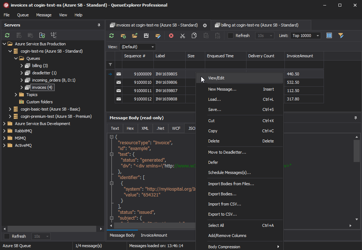
See what is happening in Azure Service Bus and resolve message problems without writing one-off tools. Browse queues and topic subscriptions, inspect message contents, and manage your Azure Service Bus environment from one desktop application. Try it free on Windows, macOS, or Linux.