MSMQ articles and how-to guides
Learn how to investigate and manage Microsoft Message Queuing messages with QueueExplorer. These guides cover non-destructive browsing, message content inspection, selected deletion, queue-to-queue movement, journals and subqueues, dead-letter recovery, and message-level backup and restore.
MSMQ articles and how-to guides
Introduction to MSMQ
Surviving poison messages in MSMQ
MSMQ built-in management console vs QueueExplorer
How to browse and inspect MSMQ messages
How to delete specific messages from an MSMQ queue
How to move selected MSMQ messages to another queue
How to back up and restore MSMQ messages
QueueExplorer: a better way to inspect and manage MSMQ
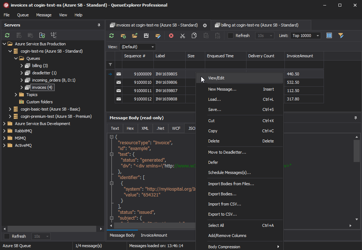
See what is happening in MSMQ and resolve message problems without writing one-off tools. Browse application, journal, subqueue, outgoing, and dead-letter messages; inspect their contents; and manage local or remote MSMQ computers from one Windows desktop application. Try it free on Windows.