How to replay RabbitMQ dead-letter messages
Published July 21, 2026
To replay a RabbitMQ dead-letter message, republish it from the dead-letter queue to the queue or exchange that should process it, confirm that the publish succeeded, and only then remove the dead-letter copy. Fix the reason it failed before replaying it, or the message may immediately return to the dead-letter queue.
RabbitMQ does not have a special operation that restores a dead-lettered message in place. A replay creates a new message at the end of its destination queue. You can perform that controlled republish in QueueExplorer without writing a temporary recovery application.
x-death headers, correct the failure,
copy a small batch to the intended destination, verify that the consumer handles it successfully, and then
delete the originals from the dead-letter queue. Use Cut or Move only after you are confident in the route.
Free trial for Windows, macOS, and Linux
Before replaying dead-letter messages
A message was dead-lettered for a reason. Depending on the queue configuration, that reason may be a consumer rejection, an expired TTL, a queue length limit, or a delivery limit. Replaying everything before understanding the cause can overload a recovering consumer or create an endless queue-to-DLQ cycle.
- Identify and fix the failure. Correct the consumer, dependency, routing, or message data that caused the dead-lettering.
- Preserve a recovery copy. Back up important messages or use Copy for the first test rather than immediately moving them.
- Check the destination. Confirm that the queue or exchange exists and that current bindings will route the message where you expect.
- Control consumers. Pause them when you need to inspect the result before processing, or when message order matters.
- Start with one message. Validate one representative failure before increasing the batch size.
How to replay a RabbitMQ dead-letter message with QueueExplorer
1. Open the dead-letter queue
Connect to RabbitMQ in QueueExplorer and open the queue that receives dead letters. QueueExplorer marks dead-letter queues and exchanges in the object tree. Load only the number of messages needed for the investigation instead of reading a large production DLQ all at once.
2. Inspect the message and its death history
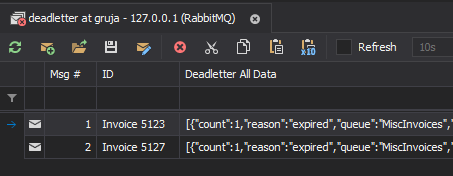
Check the body, message properties, custom headers, and the analyzed dead-letter columns. The most useful fields are the first and latest dead-letter queue, exchange, reason, routing keys, time, and count. Filter these columns to isolate messages that failed for the same reason or came from the same source.
If the payload itself is wrong, open it in the editor and correct the copy before sending it. Keep the original until the corrected message has been processed successfully.
3. Select the replay destination
Choose whether to send the message directly to a queue or publish it through an exchange. Direct replay is more predictable when exactly one known queue should receive the message. Exchange replay is appropriate when you want RabbitMQ to apply the current bindings and possibly route copies to multiple queues.
4. Copy a test message and verify it
Copy the selected message, open the destination queue, and paste it there. You can also drag messages to a queue or exchange. When publishing to an exchange, verify the routing key against the message's dead-letter history; the routing key used by the DLQ is not necessarily the one that originally reached the source queue.
Confirm that the destination queue received the replay and that the consumer completed it. Then remove the original from the DLQ. For later batches, Cut and Paste or drag-and-drop can perform the move directly, but copy-verify-delete provides the safest first run.
For the mechanics of selecting and moving batches, see how to move selected RabbitMQ messages to another queue.
Should you replay to the original queue or exchange?
| Replay target | What happens | Use it when |
|---|---|---|
| Original queue | The new message is delivered to that queue without relying on the application's normal exchange bindings. | You know the exact queue that must retry it and do not want additional routed copies. |
| Original exchange | RabbitMQ applies the exchange's current bindings using the routing key you supply. | The normal publish route must run again, including fanout to other bound queues. |
| Recovery or parking queue | The message stays isolated from normal consumers for repair or later review. | The failure is not fixed, the payload needs editing, or the retry limit was reached. |
Remember that bindings may have changed since the message first failed. Publishing to the original exchange replays today's topology, not a historical snapshot of it. If that could create unwanted copies, target the intended queue directly.
How to read the x-death headers
RabbitMQ adds dead-letter history to AMQP 0-9-1 messages. The x-death header is an array ordered
with the most recent event first. Events with the same queue and reason are compressed into one entry whose
count increases. An entry can include:
queueandexchange— where the message was when that death occurred;reason— such asrejected,expired,maxlen, ordelivery_limit;routing-keys— the routing keys used before that dead-letter event;timeandcount— when and how many times that queue/reason pair occurred;original-expiration— the message's former per-message TTL, when applicable.
The x-first-death-queue, x-first-death-exchange, and
x-first-death-reason headers record the first dead-letter event and do not change. The
corresponding x-last-death-* headers describe the latest event. This distinction matters when a
message has passed through several retry or dead-letter queues.
See RabbitMQ's official dead-letter exchange documentation and our overview of RabbitMQ dead-letter exchanges and queues for more detail.
How to prevent a dead-letter retry loop
- Set a retry ceiling. Use the relevant
x-deathcount, an application retry header, or a queue delivery limit. Send exhausted messages to a parking queue for manual review. - Replay in bounded batches. Watch the destination, DLQ, consumer error rate, and dependent services before sending the next batch.
- Quarantine permanent failures. Invalid schemas, missing required data, and unsupported message versions will not improve with another identical attempt.
- Make consumers idempotent. A publish can succeed even if the recovery client loses the confirmation, so retrying the recovery operation can create duplicates.
- Do not assume TTL will be restored. RabbitMQ removes a message's original expiration when
dead-lettering it and records it as
original-expiration. Decide explicitly whether the replayed message needs a new TTL.
RabbitMQ also detects some dead-letter cycles and can drop a message when it completes a cycle without a consumer rejection. Cycle detection is a last line of defense, not a replay strategy.
How to automate dead-letter replay safely
For recurring or high-volume recovery, build a small replay consumer instead of manually moving large batches. Use manual consumer acknowledgements and publisher confirms:
consume one message from the DLQ with manual acknowledgement
validate the message, retry count, destination, and routing key
publish a new message to the destination
wait for publisher confirmation and handle unroutable returns
if confirmed: acknowledge the original DLQ delivery
if not confirmed: negatively acknowledge and requeue the DLQ delivery
This order avoids intentionally deleting the recovery copy before RabbitMQ accepts the replacement. It is still an at-least-once workflow: a connection failure at the wrong moment can leave both copies, so use a stable message ID or business key for deduplication. Do not automatically replay messages forever; enforce the same retry ceiling and parking-queue rules as the manual workflow.
What replay does not preserve
- Queue position: the replay is a new message added at the destination queue's tail.
- Strict order: existing messages and active consumers can change the order in which the replay is observed.
- Exactly-once delivery: network failures and uncertain confirms can produce duplicates.
- Every original property: the source exchange, routing key, timestamp, or expiration may change when a message is copied, edited, or sent to a different target.
Frequently asked questions
Can RabbitMQ automatically replay messages from a dead-letter queue?
RabbitMQ dead-letters messages to an exchange but does not provide a one-click replay operation. You can republish selected messages with QueueExplorer, write a recovery consumer, or design retry queues that route messages back after a delay. Every automated design should have a retry limit and a final parking queue.
Should I delete the message from the DLQ before replaying it?
No. Publish and confirm the replacement first. Remove or acknowledge the DLQ original only after the destination has accepted it. Copying a small first batch makes it easier to verify the route and consumer.
Does replaying a message reset its x-death count?
Republishing creates a new message, but copied headers may preserve its existing dead-letter history. If the
message is dead-lettered again, RabbitMQ updates that history. Treat x-death as diagnostic broker
metadata and use an explicit application retry policy when recovery limits must be unambiguous.
Can I edit a dead-letter message before replaying it?
Yes. QueueExplorer can edit the body and properties, then send the corrected copy to a queue or exchange. Keep the original until the corrected message is confirmed and processed.
For related workflows, see RabbitMQ GUI for viewing, searching and editing messages and how to back up RabbitMQ messages.
QueueExplorer: a better way to inspect and manage RabbitMQ
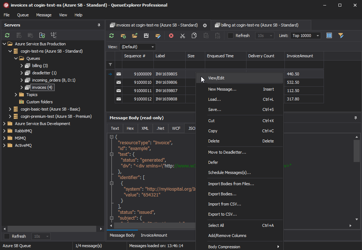
See what is happening in RabbitMQ and resolve message problems without writing one-off tools. Browse queues and streams, inspect message contents, and manage your RabbitMQ environment from one desktop application. Try it free on Windows, macOS, or Linux.