How to repair and resubmit Azure Service Bus DLQ messages
Published July 21, 2026
To repair and resubmit an Azure Service Bus dead-letter queue message, open the queue or subscription's Deadletter subqueue in QueueExplorer, inspect its dead-letter reason, body, and properties, save a backup, correct the payload or the underlying system fault, and send a new message to the original queue or parent topic. Verify that the new message succeeds before removing the original from the DLQ.
Resubmission is not an in-place state change. Azure Service Bus creates a new active message with a new Sequence Number, Enqueued Time, and delivery state. The dead-lettered copy remains in the DLQ until it is explicitly settled or deleted.
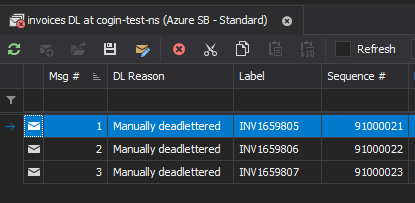
1. Open the correct Azure Service Bus dead-letter queue
- Connect QueueExplorer using Microsoft Entra ID, SAS, or the Azure Service Bus Emulator, with rights to browse, send, and settle messages.
- Expand the source queue or the topic subscription that failed.
- Open its Deadletter subqueue.
- Use the separate Transfer Deadletter view when auto-forwarding or send-via transfer failed.
- Load a bounded batch and filter by dead-letter reason, Message ID, time, or business property.
Every queue and every subscription has its own DLQ; there is no single namespace-wide dead-letter queue. A topic does not have a topic-level DLQ because the stored copies belong to its subscriptions. Microsoft documents the standard paths and behavior in its Azure Service Bus DLQ guide.
Free trial for Windows, macOS, and Linux
2. Diagnose why the message was dead-lettered
Inspect the Dead Letter Reason and Dead Letter Description first, then compare the failed message with a message that the consumer processed successfully. Review the body encoding, Content Type, schema version, Message ID, Correlation ID, Session ID, TTL, application properties, Delivery Count, and enqueue time.
| Reason or symptom | What to investigate before resubmitting |
|---|---|
MaxDeliveryCountExceeded |
Consumer exceptions, lock expiry, repeated abandon, long processing, dependencies, and idempotency |
TTLExpiredException |
Backlog age, entity TTL, message TTL, consumer capacity, and whether stale work is still valid |
Session ID is null |
The required Session ID and the correct ordered processing group |
HeaderSizeExceeded |
Oversized application properties or headers; remove unnecessary data rather than truncating blindly |
MaxTransferHopCountExceeded |
Auto-forwarding loops or chains that exceed the supported transfer-hop limit |
| Application-defined reason | Consumer validation, schema, authentication, business rule, and exception details |
For transfer DLQ messages, inspect the source entity's forwarding configuration and the destination's existence, status, capacity, and permissions. Replaying into the same broken route only recreates the transfer failure.
Decide whether the message should be replayed
Do not automatically resubmit every DLQ message. Archive or delete a reviewed message instead when it represents expired business work, an unsupported schema, a permanently rejected command, a duplicate whose effect already occurred, malicious input, or data that policy requires you not to process.
3. Back up and repair the message or its environment
- Save the original message to QueueExplorer's
.mqformat before changing it. - Record its source entity, DLQ, reason, description, Message ID, Sequence Number, Session ID, and incident ID.
- Correct the actual fault: deploy the consumer fix, restore a dependency, repair forwarding, increase capacity, or edit invalid message data.
- If editing the message, preserve application properties that still have meaning and remove only values known to be wrong.
- Choose a valid TTL and Session ID for the new active message.
- Test the repaired message in a non-production or isolated queue when the downstream effect is risky.
Changing a payload to make deserialization pass is not enough if it changes business meaning. Validate the repaired body against the producer and consumer schema, retain an audit copy, and obtain the appropriate approval for financial, personal, or security-sensitive messages.
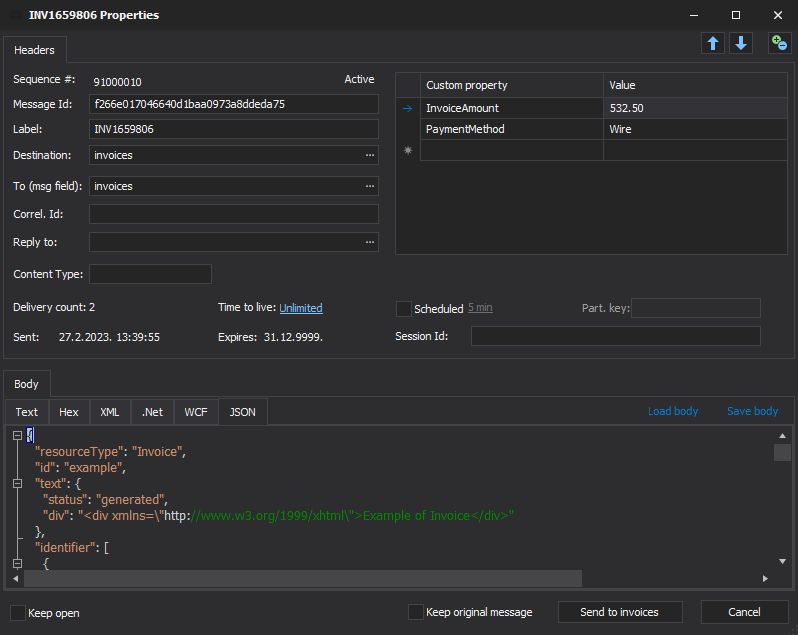
4. Resubmit the repaired DLQ message
- Open the DLQ message in QueueExplorer's message editor.
- Correct the body, headers, application properties, TTL, or Session ID as required.
- Select the original queue as the destination, or select the parent topic for a subscription message.
- Keep the original DLQ message while testing the first repaired copy.
- Send one canary message and wait for a successful consumer result.
- Only after verification, remove or settle the original DLQ copy to prevent a later duplicate replay.
You can also use copy/paste, drag-and-drop, or a saved .mq file for reviewed selections. Whichever UI
workflow you choose, the broker operation is logically a new send followed by settlement of the old DLQ message;
it is not the original broker record returning to active state.
Why replaying a subscription DLQ message can create copies elsewhere
A topic subscription is a receive-only endpoint. Azure Service Bus does not provide a send operation that targets a subscription, nor an operation that moves a DLQ message directly back into the active part of that subscription. To use the normal messaging path again, QueueExplorer must send the repaired message to the parent topic.
Service Bus treats that send as a new publication and evaluates the current rules for every subscription on the topic:
- The original subscription receives one or more new copies only if its current rules match the resubmitted message.
- Every other subscription with matching rules can also receive one or more new copies, depending on its rule actions.
- A subscription that successfully processed the original publication can therefore receive and process the replay again.
- If rules or repaired message properties differ from the original publication, the replay can reach a different set of subscriptions.
Before resubmitting a subscription DLQ message:
- Export or review the current rules for every subscription on the topic.
- Evaluate the repaired message properties against those rules and list every expected destination.
- Check whether any other subscription already completed the original message and whether its consumer is idempotent.
- Send one canary while retaining the original DLQ copy, then inspect all matching subscriptions and downstream effects.
- For a batch, calculate and monitor the total fan-out rather than treating one topic send as one queued message.
If copies in other subscriptions are unacceptable, do not publish the message to the parent topic. Use an isolated recovery queue, a dedicated replay endpoint, or an application-specific repair process that invokes only the intended consumer. Those are alternative recovery paths; they do not restore the message to the original subscription.
What changes after resubmission?
| Data | Resubmitted message |
|---|---|
| Body and application properties | Can be preserved or deliberately repaired |
| Message ID and correlation fields | Can be preserved, subject to duplicate detection |
| Session ID | Must be valid and determines the processing session |
| Sequence Number and Enqueued Time | Assigned again by the destination |
| Delivery Count and lock state | Recreated by the destination; the original receive state is not copied |
| Dead-letter reason and description | Keep them in the incident record; the new active copy is not dead-lettered |
5. Verify processing before cleaning up the DLQ
- Confirm the new message appears in the intended queue or subscription. For a topic replay, inspect every other subscription whose current rules match the message.
- Compare its body, Message ID, Correlation ID, Session ID, Content Type, TTL, and application properties.
- Start one consumer instance and watch its logs, downstream writes, and dead-letter counts.
- Verify the business outcome, not just disappearance from the active queue.
- Check whether another copy returned to the DLQ and capture its new reason.
- Settle the original DLQ message and update the incident or replay audit.
If duplicate detection is enabled, sending a preserved Message ID inside its configured history window can report success while Azure Service Bus discards the new copy. Microsoft documents that only the Message ID, together with the partition key in applicable configurations, is used for duplicate detection. Verify that a destination copy actually exists.
How to replay a batch of DLQ messages safely
- Group messages by dead-letter reason, schema version, source, and required repair.
- Back up the exact selection and record its count and Sequence Number range.
- Deploy and validate the shared fix before replaying the group.
- For a subscription DLQ, identify every subscription that each replay will match and include the expected fan-out in capacity planning.
- Send a small canary batch while retaining the originals.
- Throttle the next batches to match consumer and downstream capacity.
- Reconcile sent, processed, failed, suppressed, and original-DLQ counts after every batch.
- Stop immediately if the DLQ count rises or downstream side effects diverge from expectations.
For a recurring or large-scale recovery process, use a purpose-built replay service with checkpoints, idempotency, rate control, structured audit records, and current Azure Service Bus SDKs. A desktop workflow is best for controlled investigations and selected-message repair.
Session, TTL, and transfer-DLQ cautions
- Sessions: preserve or deliberately change the Session ID. Replaying an old message later can violate the business order expected within that session.
- Expired messages: choose a new valid TTL only if the underlying business action is still timely. Do not turn stale work into current work without review.
- Transfer DLQ: repair the auto-forward or send-via route and capacity problem first. The TDLQ is attached to the source entity that attempted the transfer.
- Side effects: a consumer may have performed some work before the original failed. Require idempotent handling or reconcile external effects before replay.
Frequently asked questions
Can I move an Azure Service Bus message from the DLQ back to the queue?
You can resubmit its data as a new message to the original queue. Azure Service Bus does not change the existing dead-lettered record back to active state; settle that original after the new copy is verified.
Can I replay a DLQ message directly to its original topic subscription?
No. Subscriptions are receive-only. Resubmitting through the parent topic evaluates every subscription's current rules and can create copies outside the original subscription. If that fan-out is unacceptable, use a separate recovery path rather than the normal topic route.
Can I edit an Azure Service Bus DLQ message before resubmitting it?
Yes. QueueExplorer can display and edit the body and applicable properties before sending a repaired copy. Keep a backup and preserve an audit record of the original.
Do Azure Service Bus DLQ messages expire automatically?
No. Microsoft documents that TTL is not observed in the DLQ and that there is no automatic DLQ cleanup. Messages remain until a receiver explicitly settles them.
Why did a resubmitted DLQ message disappear?
It may have been consumed quickly, routed to one or more topic subscriptions, dead-lettered again, or suppressed by duplicate detection because its Message ID was still inside the detection window. Check the active count, every relevant subscription, consumer logs, DLQ, and duplicate-detection configuration.
Should I change Max Delivery Count instead of repairing the message?
Increase it only when normal processing legitimately needs more delivery attempts. A larger value does not fix a deterministic poison message and can waste resources or delay diagnosis.
Related Azure Service Bus guides
- Search and filter Azure Service Bus messages
- Back up and restore Azure Service Bus messages
- Move selected Azure Service Bus messages
QueueExplorer: a better way to inspect and manage Azure Service Bus
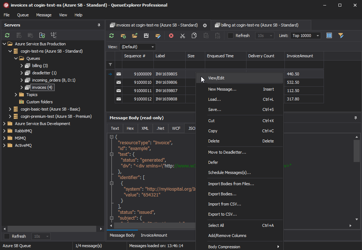
See what is happening in Azure Service Bus and resolve message problems without writing one-off tools. Browse queues and topic subscriptions, inspect message contents, and manage your Azure Service Bus environment from one desktop application. Try it free on Windows, macOS, or Linux.