How to back up and restore ActiveMQ messages
Updated July 21, 2026
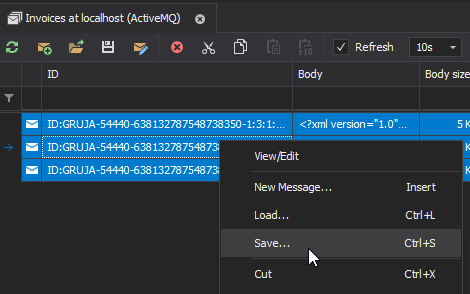
To back up ActiveMQ messages with QueueExplorer, browse the source queue, load and
select the required messages, then save them to a compressed .mq file. The file can contain multiple
messages and preserves their bodies and properties so they can later be loaded into a queue.
This guide applies to Apache ActiveMQ Classic. QueueExplorer does not currently support ActiveMQ Artemis.
1. Decide what the backup must protect
| Goal | Suitable method | What it preserves |
|---|---|---|
| Restore selected messages | QueueExplorer .mq file |
Message bodies and properties for later loading |
| Analyze payloads with other tools | Export message bodies | Body bytes only; not the full message metadata |
| Recover the broker after failure | Broker-native, coordinated backup procedure | Persistent store, configuration, identities, and related infrastructure as designed |
Define the source broker, queues, dead-letter queues, time window, and selection criteria before exporting. A live queue changes while it is browsed, so stop producers and consumers or establish an application maintenance window when the backup must represent a precise boundary.
2. Save restorable messages to an .mq file
- Connect QueueExplorer and open the source queue.
- Set a practical load limit and let the required messages load. Use Show all only after confirming that the queue size and workstation resources make that safe.
- Filter and inspect the working set, then select the messages to protect. Use Select All only when the displayed scope is correct.
- Choose Save, use the toolbar button, or press Ctrl+S.
- Store the resulting
.mqfile in an access-controlled location and record its broker, destination, date, and selection criteria.
Split very large exports into documented batches instead of relying on one enormous in-memory selection. For example, you can segment by application property, timestamp range, or operational incident. Keep a manifest with file hashes, counts, source destinations, and creation times when the backup is part of a controlled recovery process.
ActiveMQ's maxBrowsePageSize destination policy can cap the messages returned to a browser even when
QueueExplorer is set to Show all. Compare the queue count with the loaded count and investigate any QueueExplorer
warning; see the ActiveMQ browsing limitations
before declaring an export complete.
Export message bodies only when full restoration is unnecessary
Choose Export bodies to write each payload to a separate file for editing, diffing, malware inspection, or analysis by other tools. The exported bytes represent the body, but the files do not retain the complete JMS headers and application properties needed to recreate the original message faithfully.
.mq file as well.
3. Restore messages into a controlled destination
- Create or choose a test or quarantine queue whose consumers are stopped.
- Open that queue in QueueExplorer and load the
.mqfile. - Compare message counts, representative bodies, and important properties with the backup manifest.
- Confirm that the target consumer understands the payload and metadata.
- Load the file into the production destination only after the test succeeds, then resume consumers gradually.
A restore sends messages to the destination again; it does not rewind the broker to its earlier state. Broker-owned delivery data can be regenerated, restored messages may join newer messages already in the queue, and loading a file twice can create duplicates. Consumers should be idempotent where replay is possible.
Validate the backup before you need it
- Open the file from the same QueueExplorer version used by the recovery procedure.
- Restore a sample to an isolated queue and compare counts, payloads, and critical properties.
- Check whether expired business data should be replayed at all.
- Verify file hashes after copying the backup to another system or storage tier.
- Document who can access the file and when it should be deleted.
Message payloads often contain credentials, tokens, personal data, or regulated information. Encrypt backup storage, restrict access, avoid placing exports in source control, and apply the same retention rules used for the source system.
Queues, topics, and dead-letter queues
Queue exports protect messages currently available for browsing on the selected queue. Dead-letter queues can be
backed up in the same way, but a shared ActiveMQ.DLQ can contain messages from several original destinations;
preserve enough metadata to route them correctly during recovery.
An ActiveMQ topic is not a historical queue. QueueExplorer's topic viewer displays publications that arrive while it is connected, so it cannot retrospectively export non-durable topic messages published earlier. Any retained offline backlog depends on the durable subscriptions configured by the application.
Back up broker configuration and persistence separately
A disaster-recovery plan must cover more than individual messages. Depending on the deployment, it can include the ActiveMQ configuration, persistent message store, destination policies, users and authorization, TLS material, plugins, network connectors, operating-system service configuration, and the procedure for restoring them consistently.
Follow the backup procedure for the broker's persistence adapter and your infrastructure platform. Test the full restore on an isolated broker; copying live store files without a supported consistency procedure can produce an unusable or incomplete backup.
Frequently asked questions
Does saving messages remove them from ActiveMQ?
No. Saving is a copy operation. The source messages remain in the queue unless a consumer or a separate delete or move operation removes them.
Should I set the queue limit to Show all?
Only when you have checked the backlog size and available memory. For a large queue, export documented batches and verify each one instead of trying to load everything at once.
Can I restore the .mq file to another ActiveMQ broker?
Yes. Connect to the target ActiveMQ Classic broker, open the destination queue, and load the file. Test compatibility and expect broker-owned delivery information and queue position to differ from the source.
Related ActiveMQ guides
- Browse and inspect ActiveMQ messages
- Move selected ActiveMQ messages to another queue
- Delete specific messages from an ActiveMQ queue
QueueExplorer: a better way to inspect and manage ActiveMQ
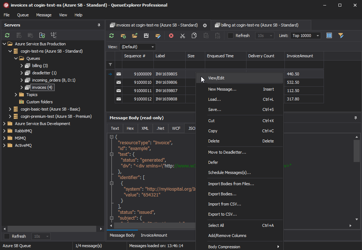
See what is happening in ActiveMQ and resolve message problems without writing one-off tools. Browse queues and live topics, inspect message contents, and manage your ActiveMQ Classic brokers from one desktop application. Try it free on Windows, macOS, or Linux.