In the first part of this series, I described why we chose Electron for the new QueueExplorer frontend while keeping the existing .NET backend.
This article describes the architecture we ended up with, why Electron owns the application lifecycle, how the .NET backend fits into that model, and what we learned from having a process boundary inside a desktop application.
As with the rest of this series, this is not presented as a universal architecture. It is the structure that worked for QueueExplorer and its existing codebase.
Three parts of the Application
At a high level, the application consists of three important parts:
- Electron main process – controls lifecycle of entire app and individual windows, communicates with .Net process and passes results to renderer
- Electron renderer process – handles all the GUI
- .NET backend process – handles all the connections to message brokers, loading brokers’ metadata, iterating through messages… It also handles all file operations, exporting, importing, storing settings, etc.
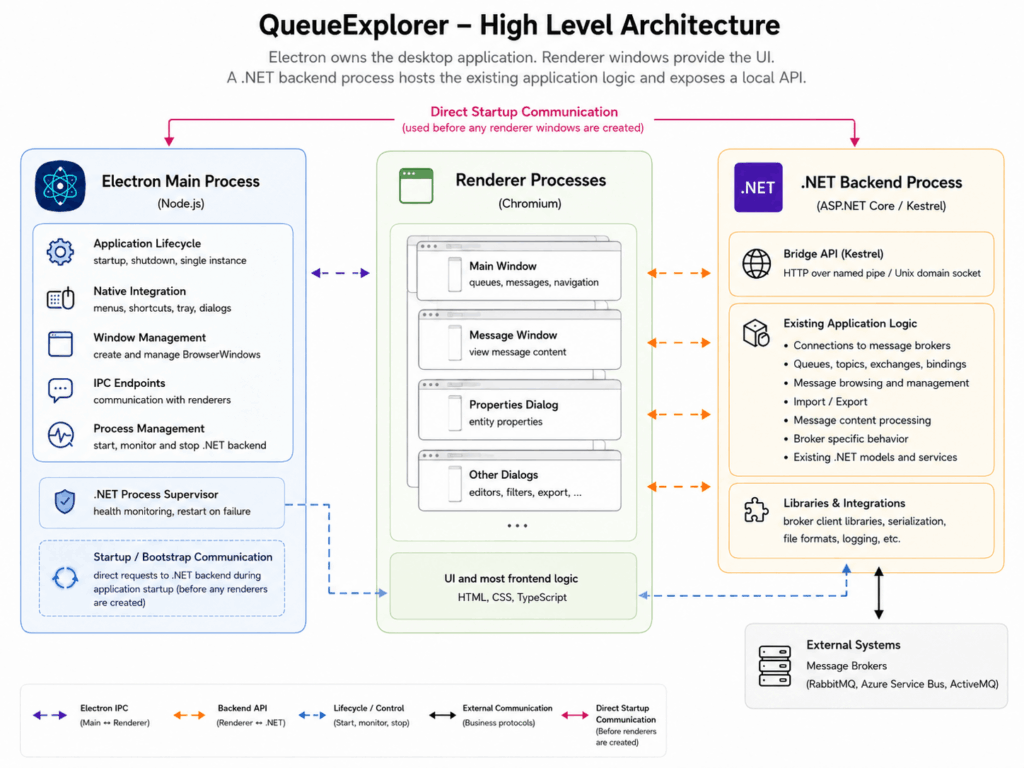
While it was easy to decide what belonged in the .NET process – as much of the existing non-GUI code as possible – the division between Electron’s two processes was less clear at first. The renderer obviously handles everything that happens inside the browser window, but a significant amount of code could reasonably live in either process. It quickly became apparent that the renderer was the better choice because debugging was much easier: Chromium’s Developer Tools were already attached. Debugging Electron’s main process was always painful, and even more so when execution crossed the boundary between the two processes. As a result, we keep code in the main process to a minimum and try not to change it often.
Architectural choices sometimes depend on developer tools.
Electron Owns the Application Lifecycle
One of the first architectural questions was which process should be considered the main application from the user’s standpoint. There was one supposedly trivial thing that moved us to make Electron the main process – even though .Net is now multiplatform, our .Net part here is basically a command-line app, without MAUI or any other GUI toolkit, and it doesn’t handle app icons. Especially not multiple icons for different OSes. So Electron is the launch process for production.
Why Launching .NET First Was Still Useful
Debugging two (or should we say three) runtimes at the same time is inherently more complicated than debugging a traditional WinForms application. If you launch an Electron as a startup process from Visual Studio, you have to attach the debugger to the .Net child process manually each time you need it. At least I couldn’t make it attach automatically. It’s a different story in Visual Studio Code with its launch configurations, but the “big” Visual Studio is still our main environment, for the WinForms designer if for nothing else.
And since the renderer process has its own debugger in the form of Chromium’s Developer Tools, you’re not using the VS debugger for the Electron part anyway. Its only use is for .Net code. So starting the .Net process first is a better choice while using Visual Studio.
This creates a small asymmetry between development and production, and there’s a risk of bugs we won’t notice early, but the debugging benefits can justify it. In practice, this was a non-issue, as only a few lines of code are executed in a different way depending on which process launches first. The important part is that the two startup modes ultimately establish the same application connection and expose the same backend API.
The Renderer Process
QueueExplorer has always been a dialog-based application. Users can open several messages, properties windows, editors, and other dialogs at the same time. We wanted to preserve that workflow rather than redesign everything around a single browser-style window.
In Electron, each dialog is therefore a separate BrowserWindow. This maps well to the existing user experience, but it introduces an important difference from WinForms: each window has its own renderer process and JavaScript context which doesn’t have access to objects from the parent window.
A parent window cannot pass just any kind of JS object directly to a child window. Data sent between processes must be serialized using Electron’s structured clone mechanism. Plain data objects, arrays, strings, and similar values work, but functions and objects containing unsupported references do not.
This forced us to make communication between windows explicit. Opening a dialog became more than constructing a class and passing it a few object references. We needed to decide:
- what initial data the dialog receives;
- how it requests additional information;
- how it reports changes or returns a result;
- which process owns the underlying state;
- what happens if either window closes unexpectedly.
The separation is sometimes beneficial because it discourages dialogs from depending on arbitrary parent-window state. However, it also makes patterns that are trivial in WinForms considerably more involved.
Treating every dialog as an independent BrowserWindow preserved the desktop workflow we wanted, but it made inter-window communication one of the core architectural concerns of the renderer.
The Electron Main Process and Preload Layer
We initially followed Electron’s security recommendations: context isolation was enabled, the renderer had no direct access to Node.js APIs, and privileged operations passed through a limited preload API.
This is an appropriate default when a renderer loads remote content, executes third-party scripts, or displays untrusted HTML. QueueExplorer does none of those things. Its renderer runs only the application code we package and ship; message content is displayed as data, not executed.
The strict separation therefore offered less protection for our threat model than it would for many other Electron applications, while adding both complexity and overhead. Operations had to cross additional IPC boundaries, and the cost became noticeable during performance optimization – particularly when transferring large payloads for backend communication, clipboard operations, and drag and drop.
We eventually disabled context isolation and moved some functionality into the renderer. This simplified the communication path and improved performance.
That is not a general recommendation to disable context isolation. It is a reminder that security decisions should reflect the application’s actual risks. Electron’s strict model is a sensible default, but it has a real cost, and applications that run only their own packaged code may reasonably reach a different trade-off.
The .NET Backend and Bridge Layer
While we kept as much existing code as possible, we still needed an additional Bridge layer. Its role was to expose existing functionality as an API, handle serialization, and translate between the .NET object model and the data structures used by the Electron frontend.
One of the bigger challenges was deciding what to do with large object graphs.
When the entire application ran in a single process, any part of the UI could access the objects it needed directly. Over the years, many objects had also become connected for convenience. Once the frontend moved into a separate process, that model no longer worked. We could not transfer an entire object graph every time the UI needed a few specific values.
The process boundary forced us to answer questions that had previously been irrelevant:
- Which data should remain in .NET, and which should be kept in Electron?
- How much data should be sent when opening a dialog or loading a view?
- How should changes made in Electron be synchronized back to .NET?
- Which side owns the authoritative version of an object?
- How should related objects be referenced without serializing the entire graph?
There was no single answer that worked for every case.
One technique that helped was adding stable IDs to some objects. Instead of sending complete connected object graphs, we could pass lightweight data together with object IDs. Later requests could refer to those IDs when additional information or operations were needed.
This made the communication API more explicit, but it also changed how parts of the application had to be designed. A frontend action could no longer call an arbitrary method on a backend object. It had to send a request through the Bridge, which located the relevant .NET object, performed the operation, and returned a serializable result.
The Bridge therefore became more than simple plumbing. It defined the boundary between the two applications and determined which parts of the existing object model were exposed to the frontend.
We did not keep .NET merely to avoid rewriting code. QueueExplorer already used .NET binary, XML, and JSON serialization for several file formats. Keeping that code in the backend made compatibility between the WinForms and Electron versions largely a non-issue. Both frontends continued to use the same serialization logic and therefore produced and consumed the same files.
The detailed design of this boundary – object ownership, IDs, synchronization, serialization, and API structure – deserves a separate article. For now, the important point is that preserving the backend did not mean exposing it unchanged. We needed a deliberate Bridge layer between the existing .NET world and the new Electron frontend.
Local Transport
The backend communication channel is local to the user’s machine.
Depending on the operating system, this can be implemented with local IPC mechanisms such as named pipes on Windows and Unix domain sockets on macOS and Linux.
The exact implementation details deserve their own discussion, particularly because transport support and behavior differ between .NET versions and operating systems.
The important architectural point is that we did not want the backend listening as an ordinary publicly accessible network service.
A local transport provides several advantages:
- no external network dependency;
- no need to allocate a public TCP port;
- reduced exposure to other machines;
- clearer ownership of the backend process;
- predictable communication between application components.
There are still security considerations. Local does not automatically mean private, and the application should authenticate or otherwise validate the process it communicates with where appropriate.
The transport is an implementation detail. The API contract above it is the more important long-term boundary.
Kestrel as an Internal Backend Host
Although communication used Unix domain sockets on macOS and Linux, and named pipes on Windows, it made little sense to build our own request-response protocol from scratch.
Instead, we used ASP.NET Core’s built-in Kestrel server and configured it to listen on those local transports rather than on a normal TCP port. This gave us a familiar HTTP-style programming model without exposing the backend as a network service.
Using an established server host also made the Bridge layer easier to structure. Backend operations could be exposed as explicit endpoints, with clearly defined requests and responses, instead of relying on a custom stream protocol with our own framing, dispatching, error formats, and cancellation rules.
From the application’s point of view, Kestrel is not a public web server. It is simply the host for QueueExplorer’s internal API, launched and terminated together with the desktop application.
The Cost of the Process Boundary
Splitting the application into Electron and .NET processes produced a clean separation of responsibilities, but it was not free.
Compared with a single-process WinForms application, we added:
- startup coordination;
- backend health monitoring;
- API definitions;
- data serialization;
- asynchronous communication;
- long running operation handling with progress and cancellation
- cross-process error handling;
- more complicated debugging;
- failure modes that do not exist in a single process.
Application shutdown must be coordinated. Closing the last window, quitting from the macOS menu and terminating the backend are related events, but they are not automatically the same event. And we should also take into account whether backend process is already performing some long running operation.
These problems are solvable, but they should be acknowledged early.
A process boundary is not just a deployment detail. It changes the programming model of the application.
Looking Back
The architecture introduced more infrastructure than a traditional desktop application, but it allowed us to preserve the part of QueueExplorer that was hardest to replace. That was the essential trade-off.
The final structure is straightforward at a high level:
Electron owns the application.
The renderer owns the interface.
.NET owns the application logic.
A local API connects them.
Most of the problems happened when data has to cross these boundaries.