Why We Chose .NET + Electron
QueueExplorer is a desktop application for inspecting, managing and testing messages in systems such as RabbitMQ, Azure Service Bus, ActiveMQ and MSMQ. It began in 2004 as a tool for managing MSMQ, which was itself a Windows-only technology. At that time, C# and WinForms were an easy choice. They offered a productive development environment and a sufficiently capable standard UI library for the first versions of the product.
As QueueExplorer grew, so did the complexity of its user interface. We eventually started using DevExpress controls, which enabled many features that would have been difficult or impractical to build with standard WinForms controls alone. Its advanced grid and other desktop components became an important part of the application.
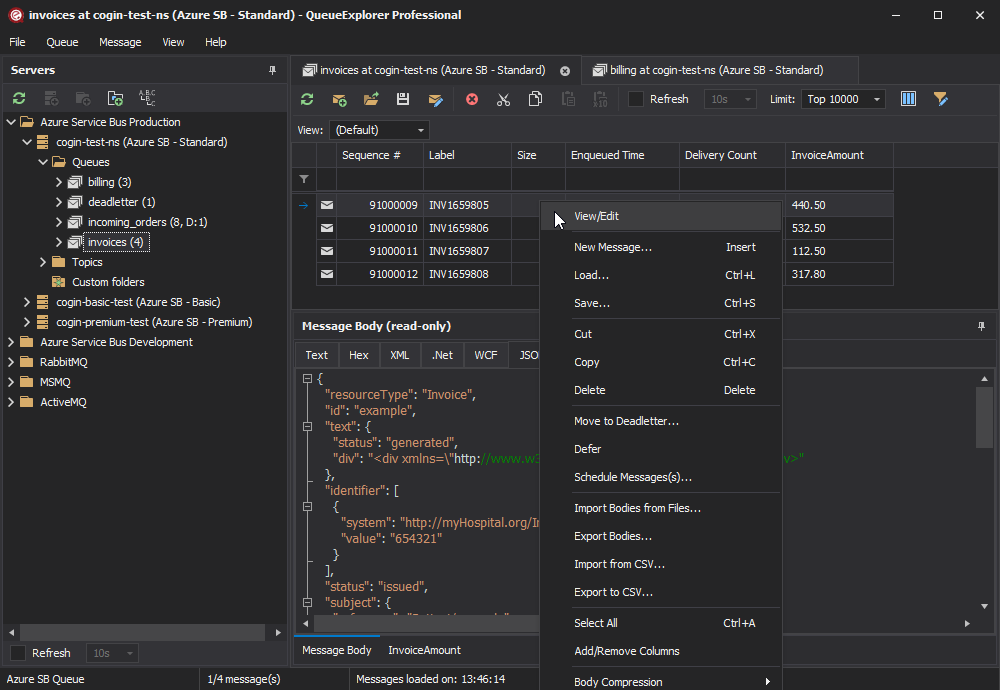
This also meant that, when the time came to evaluate cross-platform technologies, the bar had already been set quite high. We weren’t looking for a framework that could merely display forms, buttons and basic tables. We needed an ecosystem capable of supporting the rich interactions users had come to expect from a mature desktop application.
For most of QueueExplorer’s lifetime, Windows was all we needed to support. That gradually changed. More developers started using macOS and Linux as their primary development environments, and they expected the same tools to be available there. Supporting only Windows was becoming an increasingly noticeable limitation.
This article begins the story of how we brought QueueExplorer to macOS and Linux while keeping the existing .NET backend. It isn’t a tutorial, and it certainly isn’t a universal recommendation for building desktop applications. These decisions were made for our product, our team and the state of the technology at that moment. Different products and constraints may reasonably lead to very different conclusions.
Our Goals
Before evaluating technologies, we first defined what success actually meant.
Creating a cross-platform version was only one objective. Equally important were several constraints that would shape every architectural decision we made:
- Keep as much of the existing backend as possible.
- Continue releasing Windows versions throughout the migration.
- Minimize disruption for existing customers.
- Avoid maintaining multiple implementations of the same functionality.
- Build a foundation that we could continue developing for many years.
In other words, this wasn’t a greenfield project. We weren’t replacing an old application—we were evolving a mature commercial product without interrupting its development.
Why We Didn’t Rewrite Everything
The QueueExplorer code represents two decades of accumulated knowledge. Besides implementing product features, it contains countless edge cases, protocol quirks, compatibility fixes and workarounds that were discovered only after years of real-world use. While there was no way around rewriting GUI, keeping existing backend code looked (and still looks) like a no brainer. .Net is now multiplatorm, so why not just use what we already have? Yes, there’s a migration from .Net Framework to newer .Net version but that’s not that bad, or at least didn’t look bad at the start.
Rewriting that logic in another language would almost certainly introduce new bugs while providing little value to existing customers.
Another important consideration was the messaging ecosystem. Every message broker we support has mature .NET client libraries maintained by its vendor or community. Staying within the .NET ecosystem meant continuing to benefit from those libraries instead of introducing another source of uncertainty.
One Backend, Two Frontends
From the beginning, we wanted both the existing Windows application and the future cross-platform version to share the same backend.
The plan looked deceptively simple:
- Migrate the backend to modern .NET.
- Keep the existing WinForms frontend for Windows.
- Develop a new cross-platform frontend alongside it.
- Keep everything in a single source branch.
That last point deserves some explanation.
Since the migration was expected to take years rather than months, maintaining separate branches simply wasn’t practical. Every new feature, bug fix and change to broker support would eventually have to be implemented or merged in two places.
Instead, we accepted the additional complexity of working in a single branch. Every backend change immediately became part of the Windows release as well.
This approach wasn’t without cost. During development, we occasionally introduced regressions in Windows version caused by the migration work. The benefit, however, was that every improvement to the backend immediately benefited both applications.
A good example was Azure Service Bus. During the migration, we upgraded from Microsoft’s oldest client library (WindowsAzure.ServiceBus) to its current implementation (Azure.Messaging.ServiceBus). When Microsoft released the Service Bus Emulator which didn’t work with the old library, QueueExplorer already had the necessary backend infrastructure to support it with relatively little additional work. Had we maintained separate implementations, that work would have needed to be duplicated.
What We Needed From a Cross-Platform Framework
Once we knew we were keeping the backend, the question became: what should replace WinForms? QueueExplorer is not a typical CRUD application. Much of its value comes from rich desktop interaction. It needs to handle hundreds of thousands of messages in a grid with filtering and sorting, support drag and drop, clipboard operations, keyboard shortcuts, context menus, docking panels and many other interactions that desktop users simply expect.
This exposed an important consideration that is sometimes overlooked when evaluating UI technologies: the framework itself is only part of the decision. The surrounding component ecosystem can be just as important.
Many projects eventually depend on one or two sophisticated controls: a grid, chart, report designer, scheduler, diagram editor or another specialized component. A basic replacement may look sufficient during an early prototype, only for its limitations to become apparent much later.
We therefore weren’t only choosing a UI framework. We were choosing the availability of mature controls, documentation, debugging tools, community support and evidence that the platform could support a demanding commercial application for many years.
Evaluating the Options
We looked at virtually every realistic option available at the time.
Wine
The first thought was the simplest one: perhaps we could avoid rewriting the UI entirely.
Unfortunately, Wine quickly proved unsuitable for a commercial product. Installation wasn’t straightforward, especially as the first step was to install .Net Framework and turned out to be non-trivial. The application didn’t feel native, particularly on macOS. Menus, for example, didn’t behave like normal macOS menus.
.NET Framework support also presented complications. The 32-bit support was removed from macOS, and 64-bit .Net Framework turned out to be even more problematic for installation than 32-bit variant. Even when we made the app work at least on Linux, it had a lot of display glitches. A temporary workaround yes, but not a long term solution.
For our customers, it would always feel like running a Windows application on another operating system rather than using a proper application for that platform.
.NET MAUI
Being Microsoft’s own cross-platform framework made .NET MAUI an obvious candidate. But it didn’t support Linux! That’s not a way to make a cross-platform app. It might change in the future but we couldn’t gamble on it.
Also, at the time of our evaluation, its desktop support still felt immature for our requirements. Even Microsoft’s own sample application didn’t work reliably in our testing. More importantly, we couldn’t find an advanced grid component that came close to what QueueExplorer needed, not to mention other components.
Avalonia, Uno and Similar Frameworks
These frameworks were particularly interesting because they would allow us to remain entirely within the .NET ecosystem.
The problem wasn’t necessarily a missing feature we could point to. The larger problem was uncertainty. We might not know what doesn’t work until it’s too late.
QueueExplorer has a specific set of requirements, and at the time we couldn’t find many large, widely known applications demonstrating the level of complexity we needed. There may have been applications we hadn’t discovered, but from our perspective these ecosystems remained relatively unproven for software with demanding UI requirements.
We were making a decision that could affect the product for the next decade or more. Discovering a fundamental limitation halfway through a multi-year migration would have been enormously expensive. Also, ecosystem of UI components didn’t offer what we needed. Chicken and egg kind of problem – if it’s not widely used it’s not that attractive to component vendors, which in turn means entire ecosystem doesn’t get used that much.
Why We Chose Electron
Electron is often criticized for its memory and disk usage. Those criticisms are valid. Electron isn’t perfect. But it’s proven. To paraphrase Winston Churchill: “Electron is the worst cross-platform solution, except for all the other forms that have been tried”.
Applications such as Visual Studio Code had already demonstrated that Electron could support large, sophisticated desktop software used daily by millions of developers. Many other widely used applications provided further evidence that it could handle more than basic forms and data entry.
The ecosystem was mature, documentation was abundant, debugging tools were excellent, and many difficult UI problems had already been solved by the browser platform.
Web technology also offered by far the broadest selection of third-party UI components. We would later discover that even commercial web component libraries were not always on par with the mature controls available for WinForms. Nevertheless, the available ecosystem was substantially broader than what we found around the other cross-platform alternatives we evaluated.
Most importantly, choosing Electron reduced one particular kind of risk: discovering, halfway through the project, that the platform simply couldn’t support a feature our application depended on.
Electron certainly came with its own challenges—and this series will cover many of them—but they were challenges we felt confident we could solve.
Looking Back
Looking back, I still believe this was the right decision for us, with the least amount of risk.
But that was only the beginning. Next questions were how to combine a modern Electron frontend with an existing .NET backend, and how to structure browser based GUI to look and work like desktop application.
That’s the topic of the next articles in the series.